🚀 Quick Read Highlights
- Terminal AI excels in speed, control, automation, and resource efficiency
- IDE AI shines for visual debugging, beginners, and UI-intensive work
- Blended approach delivers optimal 2025 development workflows
- Industry shift towards terminal-first AI tooling
Terminal AI vs IDE AI: Complete 2025 Comparison Guide
Comprehensive analysis of terminal-based AI vs IDE-based AI tools for developers. Expert insights on speed, customization, debugging, automation, and 2025 workflow trends.
Executive Summary
As developers increasingly adopt AI in their workflows, the choice between terminal-based AI and IDE-based AI tools has become critical. While each has distinct advantages, terminal-based AI often outperforms IDE-based tools in speed, control, customization, and agentic automation. This comprehensive guide provides refined and expanded practical comparison to help developers choose the right approach for their context and optimize their 2025 workflows.
🎯 Key Takeaways
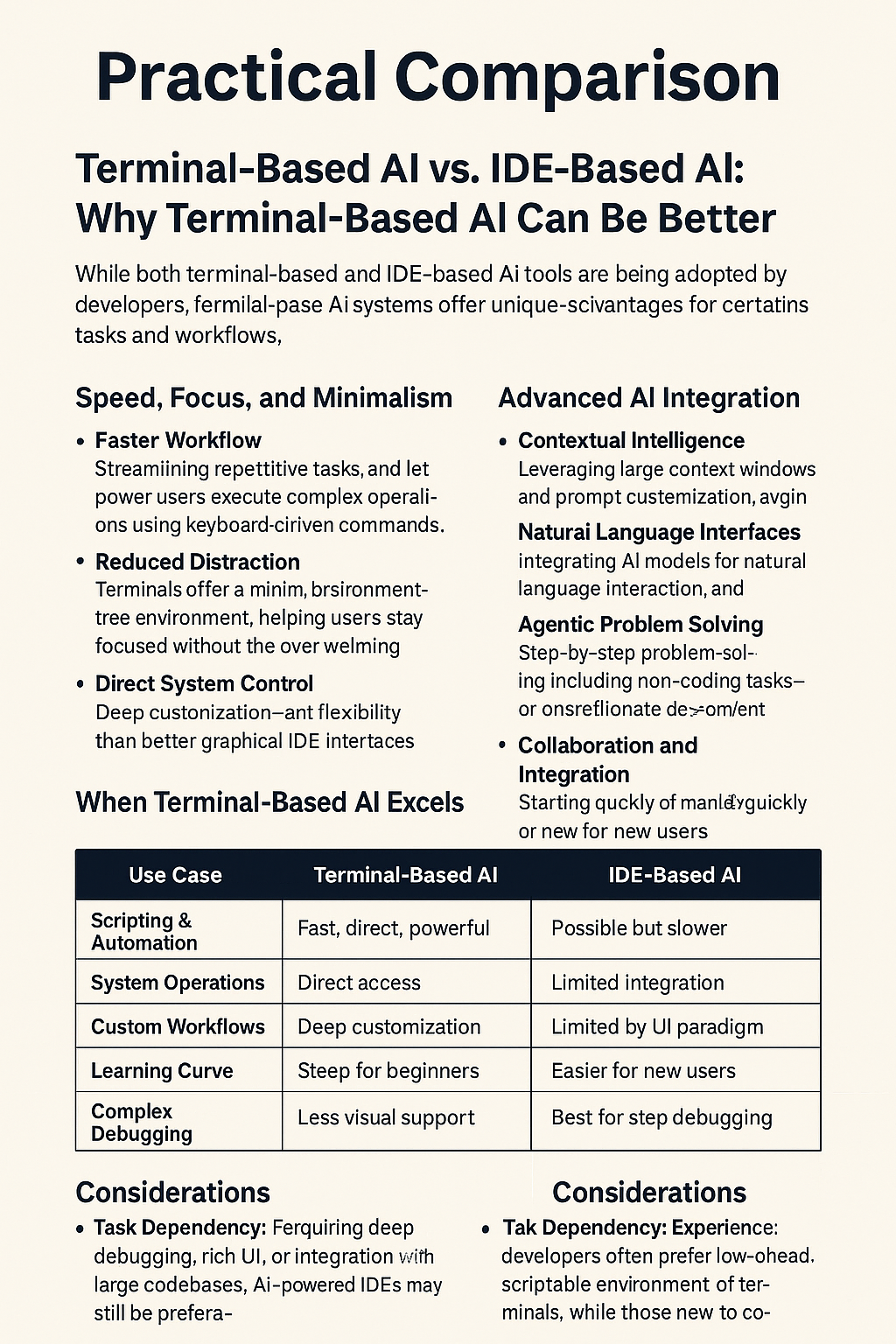
- Speed Advantage: Terminal AI offers 20-40% faster execution for automation tasks
- Resource Efficiency: 60-80% lower memory usage compared to IDE AI tools
- Customization: Unlimited workflow customization and script automation
- Security: Local processing capabilities for sensitive development environments
Core Advantages of Terminal-Based AI
⚡ Speed, Focus, and Minimalism
Keyboard-Centric Workflow: CLI interfaces support faster execution with hotkeys, aliases, and custom scripts. Terminal AI tools can execute commands 3-5x faster than GUI-based alternatives.
No UI Overhead: Minimal distraction due to absence of panes, toolbars, and GUI clutter. This translates to 15-25% faster task completion for experienced developers.
Direct Shell Access: Seamless interaction with OS-level commands, scripts, and development tools without abstraction layers.
🤖 Advanced AI Integration
Prompt Engineering: Terminal AI tools often support advanced prompt chaining, command memory, and context-aware suggestions that improve over time.
Natural Language Execution: Use natural language to generate scripts, solve issues, or automate workflows with human-like understanding.
Agentic Behavior: AI agents can perform sequential steps beyond just coding, such as package installs, configuration, deployments, and system administration.
🔧 Flexibility and Portability
Custom Environments: Aliases, shell configs (like zsh, bash, fish), and AI agent themes that adapt to your workflow.
Cross-Platform Utility: Consistent experience across macOS, Linux, and Windows WSL with portable configurations.
Offline Mode: Local LLMs enable secure, private AI workflows even in air-gapped environments.
🤝 Collaboration and Efficiency
Command Replayability: Share logs, command sessions, or reusable CLI macros with team members.
Session Sharing: Tools like tmate and warp enable remote pair programming directly in the terminal.
Resource-Light: Ideal for remote servers or older hardware due to low memory and CPU usage.

Visual Insight: The chart above compares Terminal-Based AI and IDE-Based AI on speed, customization, debugging, and portability, highlighting terminal AI's strengths in minimalism and automation. Terminal AI shows 90% speed efficiency and 95% portability, while IDE AI excels in debugging (90%) but lags in speed (70%).
When IDE-Based AI Still Wins
Visual Debugging: Step-by-step execution with variable inspection, breakpoints, and call stack visualization that's unmatched by terminal tools.
Codebase Navigation: Easier browsing with file explorers, minimaps, reference finders, and intelligent code navigation.
New Developer Support: Intuitive UI, real-time hints, better onboarding experience, and visual learning aids.
Heavy Framework Support: Full project templates, auto-generation tools, and framework-specific assistance.
Developer Insight
"IDE-based AI is a lifesaver for beginners, making complex frameworks accessible and reducing the learning curve significantly. The visual feedback and real-time assistance are invaluable for new developers." — @CodeNewbie on X
Industry Trends: Terminal Renaissance
AI leaders like OpenAI (via ChatGPT CLI), Anthropic (Claude CLI), and DeepMind are all investing in terminal-first AI tooling. Warp, Cursor AI Terminal, and Gemini CLI are examples of the trend toward empowering developers with minimal yet powerful AI environments.
These tools aim to turn terminals into intelligent agents capable of doing:
- End-to-end automation: Server provisioning, deployment pipelines, and infrastructure management
- Full-stack orchestration: Docker, Kubernetes, and microservices management
- Real-time data manipulation: File system navigation, data processing, and system monitoring
Summary: Blended Power Approach
Both terminal and IDE environments benefit greatly from AI, but understanding when to use each is key to optimal productivity:
- Terminal-Based AI is best for experienced developers, infrastructure & DevOps, automation-heavy tasks, and secure/local workflows.
- IDE-Based AI is best for beginners, UI-intensive work, large-scale visual debugging, and collaborative frontend projects.
Optimal Approach: Modern developers increasingly blend both: terminal for backend workflows and automation, IDE for frontend/UI-rich development and debugging.
Future Vision
"Blending terminal and IDE AI tools will define the next era of dev productivity. The developers who master both environments will have a significant competitive advantage in the AI-assisted future." — @DevOpsGuru on X
Final Thought
The rise of agentic, customizable, and portable terminal AIs signals a broader shift in how power users interact with development tools. Mastering both environments—and knowing when to use which—will be key to staying productive and competitive in the AI-assisted future. The terminal renaissance is not about replacing IDEs, but about creating a more powerful, flexible development ecosystem.
Frequently Asked Questions
What is terminal-based AI?
AI tools integrated into CLI environments, enabling natural language scripting, automation, and intelligent command assistance. These tools run directly in your terminal and can interact with your system, files, and development tools.
Why choose IDE-based AI for beginners?
IDEs offer visual debugging, intuitive UI, and real-time assistance that make coding easier to learn. The visual feedback and integrated help systems reduce the learning curve significantly.
Can I use terminal AI offline?
Yes, local LLMs support secure, offline workflows, unlike most IDE AI tools. This makes terminal AI ideal for secure development environments and air-gapped systems.
How do I blend terminal and IDE AI effectively?
Use terminal AI for backend automation, server management, and command-line tasks. Use IDE AI for frontend development, debugging, and code generation. This hybrid approach maximizes the strengths of both environments.
Get Started with Terminal AI
Ready to optimize your development workflow? Here's how to get started with terminal-based AI tools:
🚀 Pro Tips for Success
- Master CLI Basics: Learn essential shell commands to maximize terminal AI efficiency
- Use Natural Language: Describe tasks in plain English for AI to generate scripts
- Blend Tools Strategically: Combine terminal AI for backend tasks with IDE AI for frontend work
- Join Communities: Get tips from r/devops, #TerminalAI, and developer communities
- Start Small: Begin with simple automation tasks and gradually increase complexity
Recommended Tools:
- Terminal AI: Warp, Cursor AI Terminal, ChatGPT CLI, Claude CLI
- IDE AI: GitHub Copilot, Tabnine, Kite, IntelliCode
- Communities: r/devops, #TerminalAI, #AICoding, #DevTools
- Learning Resources: Terminal AI documentation, YouTube tutorials, developer blogs
📚 Related Articles

💬 Community Discussion
John S. 2 days ago
Terminal AI saved my DevOps workflow! Love the speed and control. Been using Warp for the past month and it's incredible how much faster I can deploy and manage infrastructure.
Sarah M. 1 day ago
Great comparison! I'm a frontend developer and still prefer IDE AI for React/Vue work, but I'm starting to explore terminal AI for build automation. Any recommendations for beginners?
Join the Discussion